
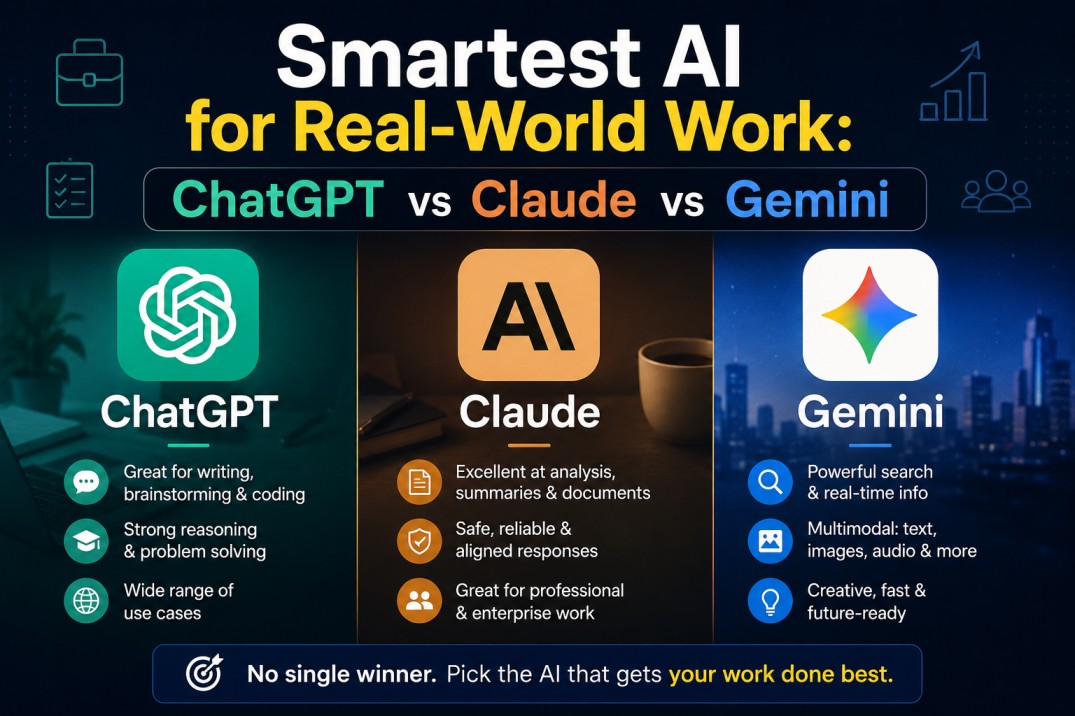
A few years ago, AI tools felt experimental. Today, people use AI daily for office work, coding, writing emails, creating reports, research, customer support, presentations, and business planning.
But one question is becoming very common now:
Table of Contents
ToggleWhich AI actually feels the smartest for real-world work?
People do not care only about fast answers anymore. They want tool which understands instructions properly, saves time, gives useful answers, and helps complete tasks without confusion.
Many AI tools are available today. Some AI tools are popular for coding, while others are better for writing, research, or office productivity.
In real daily work, only a few AI tools actually feel reliable across different tasks.
In this article, we will compare the top AI tools people use today and understand which AI feels the smartest in actual work situations.
What Makes an AI Feel Smart in Daily Work?
Before comparing AI tools, it is important to understand what “smart” really means in practical use.
An AI may look impressive in advertisements or demo videos, but real office work is completely different.
A genuinely useful AI should understand instructions properly, remember context during long conversations, save time, and reduce unnecessary manual work.
For example, if someone asks AI to summarize meeting notes, fix code errors, create a project report, or write client emails, the AI should handle the task smoothly.
Users should not feel like they are explaining the same thing again and again.
That is usually the moment users realize whether an AI tool is genuinely helpful or just good at giving fancy answers.
ChatGPT – The Most Balanced AI for Real-World Work
At present, many professionals feel that ChatGPT is the most balanced AI for daily work.
The reason many users prefer ChatGPT is fairly straightforward. It performs well across multiple tasks.
What users like most about ChatGPT is how naturally conversations continue, especially during longer tasks.
It understands follow-up questions properly and usually maintains context better than many other AI tools.
That matters a lot during long office tasks or coding sessions.
For example, developers can ask coding questions continuously without restarting the explanation every time.
Content writers can improve articles step by step.
Office employees can draft emails, summarize meetings, and create reports quickly.
Another reason people like ChatGPT is its flexibility.
ChatGPT can switch between technical work and normal conversation very smoothly.
One moment it can explain a MATLAB error, and the next moment it can help write a professional email.
That balance makes it feel smarter in practical situations.
In long conversations, ChatGPT usually feels less frustrating compared to some other AI tools.
People use ChatGPT for many different tasks, including writing articles, debugging code, research work, email drafting, and even interview preparation.
Claude – Strong for Long Writing and Deep Analysis
Claude is another AI tool that many users respect, especially for long-form writing tasks.
It feels calm, organized, and thoughtful while answering.
People often use Claude for writing long-form articles, creating documentation, preparing research summaries, generating business reports, performing detailed analysis, and handling large text files efficiently.
One thing people notice is that Claude gives very clean and structured responses for writing-heavy tasks.
If someone regularly works with reports, policies, documentation, or long research content, Claude can feel extremely intelligent.
It handles long context very well.
Some users also feel that Claude sometimes becomes too cautious or too soft in its responses.
In fast office environments, people may prefer shorter and more direct answers.
When it comes to deep writing, detailed analysis, and handling large amounts of text, Claude remains one of the most capable and intelligent AI tools available today.
Gemini – Best for Google Ecosystem Users
Gemini has become popular mainly because of its strong integration with Google services.
It connects naturally with Google products and helps users manage their workflow faster.
For example, Gemini can summarize emails, organize documents, and assist inside Google apps directly.
This makes daily work easier for many office employees.
Gemini has also improved a lot in coding and reasoning tasks compared to earlier versions.
People already using Google apps daily usually find Gemini easier to fit into their workflow.
Even after recent improvements, some users often feel ChatGPT and Claude give more polished and natural responses.
Gemini feels powerful, but sometimes less consistent in long or complex conversations.
Microsoft Copilot – Useful for Office Productivity
Microsoft Copilot is becoming very important for companies already using Microsoft Office products.
It works seamlessly inside applications like Word, Excel, PowerPoint, Teams, and Outlook.
For office employees, this integration is very useful.
Many office employees use Copilot mainly to save time on presentations, emails, meeting summaries, and Excel-related work.
For companies already using Microsoft Office heavily, this can genuinely reduce repetitive work.
A large number of users prefer ChatGPT for brainstorming, creativity, and deeper problem-solving.
Copilot mainly focuses on productivity features inside Microsoft applications.
Sometimes Copilot feels more like a productivity assistant than a creative brainstorming partner.
So while it is very useful for office automation, it may not always feel like the smartest conversational AI.
Perplexity – Excellent for Fast Research
Perplexity has become popular because it combines AI answers with live web search.
Perplexity works especially well for people who need quick research or updated information.
Unlike traditional search engines where users open multiple websites manually, Perplexity gives direct answers with references.
This saves time for students, analysts, researchers, and content creators.
However, Perplexity is more research-focused than conversation-focused.
For deep writing, coding support, or workflow management, many users are moving back to ChatGPT or Claude.
Which AI works better in practice for Coding?
Coding is one of the biggest areas where AI tools are now heavily used.
Developers now use AI tools for everything from debugging and writing code to automation scripts and API integration.
For many programmers, ChatGPT currently feels strongest because it explains problems clearly and supports multiple technologies properly.
Claude is also very good for understanding large codebases and detailed logic explanations.
GitHub Copilot is extremely useful for real-time coding suggestions inside editors like VS Code.
It improves coding speed significantly.
But when developers get stuck and need proper explanations, many still open ChatGPT because conversations feel more interactive and intelligent.
Real-World Business Usage
AI tools are now becoming common across marketing teams, customer support departments, and even HR operations.
The smartest AI for business is not always the one with the biggest technology.
It is the one that reduces workload and improves productivity.
For example, content writers may prefer Claude for its long-form writing capabilities, developers often choose ChatGPT for coding support, Google Workspace users may find Gemini more convenient, while corporate employees frequently prefer Copilot for its integration with Microsoft Office tools.
The best AI depends on daily work requirements.
If one AI must handle multiple tasks together, ChatGPT currently feels like one of the most complete solutions for many professionals.
During long work sessions, even small mistakes or confusing replies can become frustrating quickly.
Human-Like Communication Matters
A big difference between AI tools today is communication quality.
Users no longer want robotic answers.
People prefer AI tools that understands tone, explains things naturally, and uses simple, conversational language without unnecessary complexity.
Modern AI tools have improved a lot in this area over the last couple of years.
The smartest AI is often the one that feels easiest to talk to during stressful work situations.
If users must repeatedly rewrite instructions, the AI quickly feels less intelligent.
AI Is Not Replacing Human Thinking
AI tools are excellent at speeding up repetitive work, but human judgement matters when decisions become complex.
Even though technology can automate many tasks, people are important when it comes to making final decisions, thinking creatively, understanding emotions, interpreting business needs, and applying ethical judgement in complex situations.
The best approach today is to use AI as a smart assistant, not a complete replacement for human thinking.
Professionals who combine their own skills with AI support are usually getting the best results.
So, Which AI Actually Feels the Smartest?
If we look at overall real-world usage today, ChatGPT feels like the smartest all-round AI for most people.
The reasons include better conversation quality, strong understanding of context, reliable coding support, a more natural writing style, flexible usage across different needs, multi-purpose capabilities, and dependable support for improving productivity.
That said, every AI tool has its own strengths.
| AI Tool | Best For |
|---|---|
| ChatGPT | Overall real-world work |
| Claude | Long writing and analysis |
| Gemini | Google ecosystem integration |
| Copilot | Microsoft Office productivity |
| Perplexity | Fast research and web search |
There is no single perfect AI for everyone.
But if someone wants one AI tool that can handle writing, coding, research, brainstorming, office work, and productivity together, ChatGPT currently gives the most balanced experience.
Final Thoughts
AI tools are improving very quickly. What handles tasks more naturally today may change again in the future.
At this point, AI is no longer just a chatbot people use for fun.
Some users even switch between multiple AI tools depending on the type of work they are doing that day.
It has become a serious productivity tool used by students, engineers, developers, marketers, freelancers, business owners, and companies worldwide.
In the end, people usually stick with the AI tool that genuinely helps them work faster with less frustration.
It is the one that genuinely helps people complete work faster, easier, and with fewer mistakes.
Right now, no AI tool is perfect. But for people who want one assistant that can handle writing, coding, brainstorming, and everyday work together, ChatGPT feels like the easiest option for most situations.
Frequently Asked Questions (FAQ)
Which AI feels the smartest for real-world work?
For most users, ChatGPT currently feels like the smartest all-round AI because it handles writing, coding, brainstorming, research, and office tasks smoothly in one place.
Which AI tool is best for coding?
Many developers prefer ChatGPT for debugging, code explanations, and learning new technologies. GitHub Copilot is also highly useful for real-time coding suggestions inside editors like VS Code.
Is Claude better than ChatGPT for writing?
Claude is considered very strong for long-form writing, documentation, and detailed analysis. However, many users still prefer ChatGPT for balanced everyday productivity and interactive conversations.
Is ChatGPT better than Gemini for daily work?
ChatGPT is often preferred for natural conversations, coding help, and detailed explanations. Gemini works very well for people already using Google services like Gmail, Docs, and Drive daily.
Which AI tool is best for office productivity?
Microsoft Copilot is highly useful for Microsoft Office users because it works directly inside Word, Excel, PowerPoint, Teams, and Outlook. It helps save time on repetitive office tasks and document creation.

3 thoughts on “Smartest AI for Real-World Work: ChatGPT vs Claude vs Gemini”